Give i-scribe context for the best outputs
This video walks through how to get the most out of i-scribe during a patient consultation, so it captures accurate, detailed clinical notes.
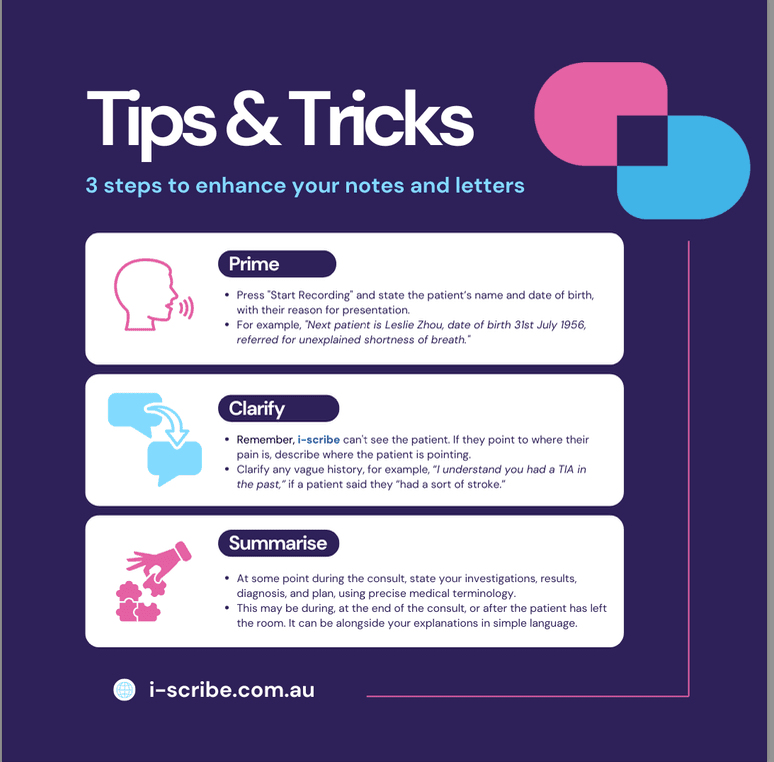
Conversation mode: prime, clarify, summarise
Loading video player...
How to get the best results from i-scribe during consultations
This video walks through how to get the most out of i-scribe during a patient consultation, so it captures accurate, detailed clinical notes.
1. Set the context before starting the consultation
- Give i-scribe some clinical context first. Before seeing the patient, press theStart Recording button and give a brief overview of the upcoming consult.
- For example, after starting the recording, open your EMR to review the patient's visit reason. You might say:"The next patient, Bob, is here for a cataract assessment, referred by an optometrist."
2. Engage with i-scribe during the consultation
- Call in the patient and start the consult as you normally would.
- While examining the patient, keep verbalising your observations for i-scribe, such as:"I have the microphone on to record my notes, so I'll speak aloud during the examination."
- Throughout the exam, clearly state your findings. For example:"The main diagnosis is cataract, and the plan is to schedule surgery in the right eye in March and the left eye in April."
3. Summarise the consultation for the patient and i-scribe
- For a straightforward consultation, summarise the key details to the patient at the end. This helps the patient understand their diagnosis and plan, and it keeps your notes clear and accurate.
- For instance, you might say:"Your main diagnosis is cataract, and we'll aim for good distance vision after surgery, with reading glasses."
4. Handle complex consultations efficiently
- For more complex or sensitive consultations, you can leave the microphone on after the patient has left the room. Use this time to clarify details for i-scribe, stating:"Diagnosis is 1, 2, 3; the plan is 1, 2, 3."
- This gives you comprehensive, accurate outputs when you hit theGenerate button.
Was this guide helpful?