How to Send i-scribe Letters to Gentu
With the i-scribe Gentu integration, you can automatically send letters from i-scribe in Gentu. This article will detail how to set up this feature in Gentu and i-scribe.
Introduction
With the i-scribe Gentu integration, you can automatically send letters from i-scribe in Gentu. This article will detail how to set up this feature in Gentu and i-scribe.
Prerequisites
You need to have set up the i-scribe Gentu integration. See the Gentu Integration article for more information if you have not yet set up the i-scribe integration with Gentu.
Setting up Gentu
For i-scribe to send letters into Gentu, you need to have a letter template that is set up to use the dictation.text attribute in Gentu. Here's the process for setting up the letter template if you do not yet have one.
- In Gentu, navigate to Settings.
- Select Letter Templates from the Templates section.
- Click + Add.
- Give the template a name (e.g. i-scribe Letter Template).
- Customise the format letter template to your preference.
- Move your cursor to select the region where you want the letter to be inserted in the template.
- Click on the References () icon in the top left.
- Select Dictation from the dropdown.
- Select Voice Dictation Text.
- You should now see the dictation.text field in the text. This is where your letter will be inserted.
- To adjust the font (or font size) of the text that comes from i-scribe into Gentu: with the "dictation.text" selected, adjust font (or font size), and click "Save" on the bottom right.
- Save the letter template.
Setting up i-scribe
You should now be able to see your letter template in i-scribe. Follow the below steps to finish setup.
- In i-scribe, navigate to Settings > Integrations.
- Select Settings for your Gentu integration.
- In the Default Letter Template dropdown, select the letter template that you just created.
- Save Changes to save your settings.
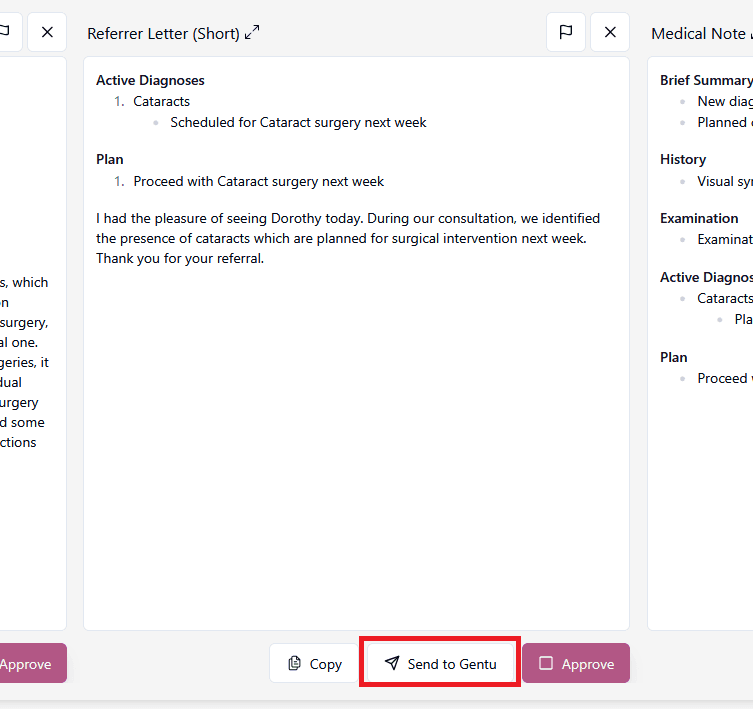
To send a letter into Gentu, open a consultation and click on the Send to Gentu button for a letter that you want to send. Clicking the button multiple times will send the letter multiple times. You can only send letters in consults created by Gentu.
Viewing Letters in Gentu
After sending a letter to Gentu in i-scribe, you will be able to view the letters in Gentu.
- Click Results/Letters in the sidebar.
- Select Outgoing Correspondence in the top tab.
- In the Draft column, you should be able to see your letters from i-scribe.
- You can choose whether the letter will be sent to the patient or the referrer using the radio buttons in Gentu.
Was this guide helpful?